Null Value Treatment in Python: Complete Guide for Data Cleaning and Data Science
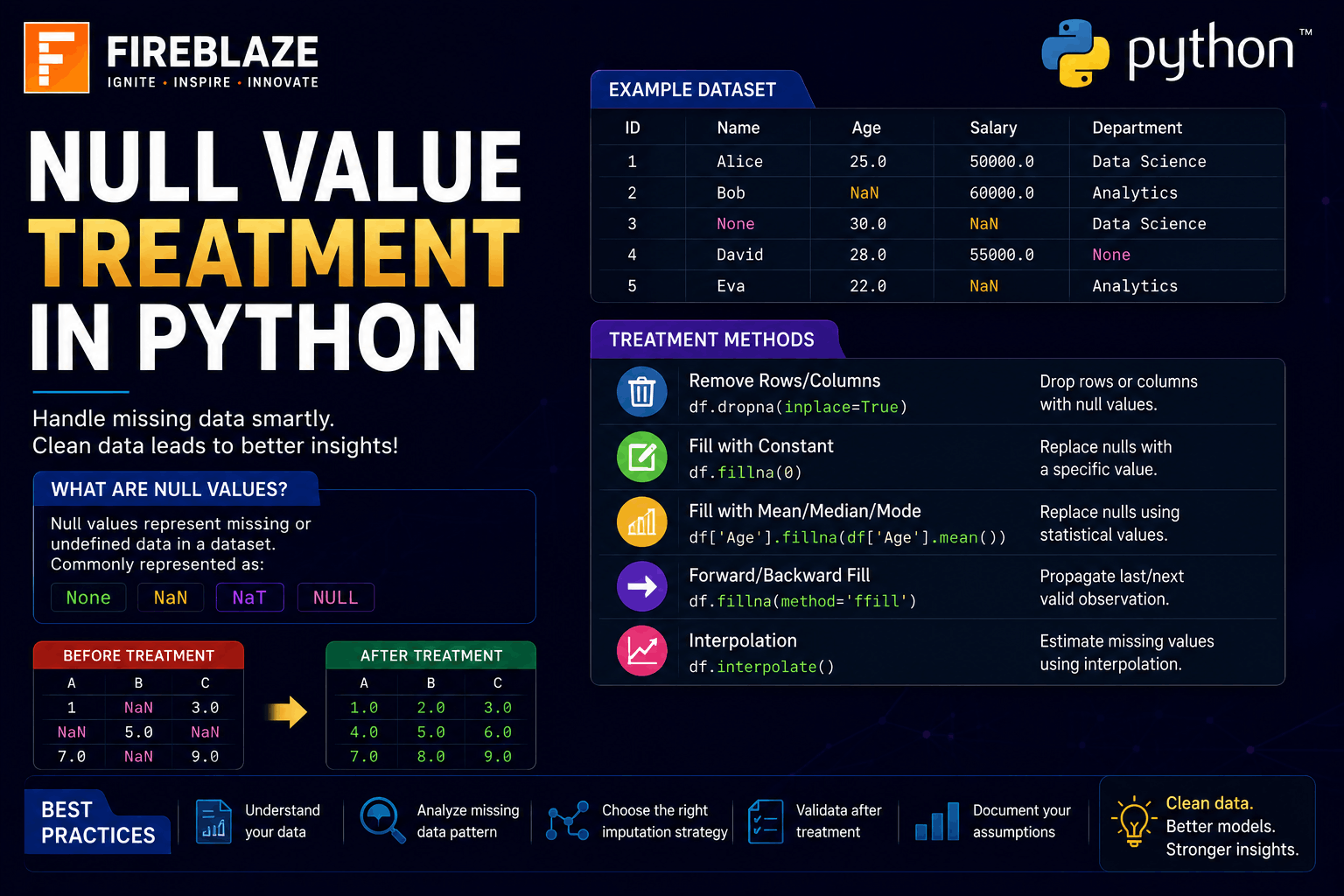
Null Value Treatment in Python: Complete Guide for Data Cleaning and Data Science
Data is one of the most valuable assets in modern technology and business. However, real-world datasets are often incomplete and contain missing information.
These missing values are known as:
Null Values
Missing Values
NaN Values
Handling null values correctly is one of the most important steps in Data Cleaning and Data Preprocessing.
If missing values are ignored, they can negatively impact:
Data Analysis
Machine Learning Models
Business Reports
Statistical Calculations
In this guide, you'll learn:
What null values are
Why null value treatment is important
Detecting missing values
Removing null values
Replacing null values
Mean, Median, and Mode Imputation
Real-world Data Science applications
What are Null Values?
Null values represent missing or unavailable data in a dataset.
Example:
| Name | Age |
|---|---|
| Rahul | 22 |
| Priya | NULL |
| Amit | 25 |
Here:
Priya's Age\nis missing.
In Python and Pandas, missing values are usually represented as:
NaN\nwhich stands for:
Not a Number\nWhy Null Value Treatment is Important?
Missing values can create several problems.
Examples:
Incorrect calculations
Biased predictions
Reduced model accuracy
Data inconsistency
Proper null value treatment helps:
Improve data quality
Increase model performance
Generate accurate insights
Improve decision-making
Import Required Libraries
Before handling null values:
import pandas as pd\nimport numpy as np\nCreating Sample Dataset
Example:
import pandas as pd\nimport numpy as np\n\ndata = {\n'Name': ['Rahul', 'Priya', 'Amit'],\n'Age': [22, np.nan, 25]\n}\n\ndf = pd.DataFrame(data)\n\nprint(df)\nOutput:
Name Age\n0 Rahul 22.0\n1 Priya NaN\n2 Amit 25.0\nDetecting Null Values
Pandas provides:
isnull()\nExample:
df.isnull()\nOutput:
Name Age\n0 False False\n1 False True\n2 False False\nCounting Null Values
To count missing values:
df.isnull().sum()\nOutput:
Name 0\nAge 1\nThis shows:
Age\ncontains one missing value.
Removing Null Values Using dropna()
The:
dropna()\nfunction removes rows containing null values.
Example:
df.dropna()\nOutput:
Name Age\n0 Rahul 22.0\n2 Amit 25.0\nThe row containing:
NaN\nis removed.
Removing Columns with Null Values
Example:
df.dropna(axis=1)\nHere:
axis=1\nremoves columns containing null values.
Replacing Null Values Using fillna()
Instead of removing data, we can replace missing values.
Example:
df.fillna(0)\nOutput:
Name Age\n0 Rahul 22\n1 Priya 0\n2 Amit 25\nMean Imputation
One of the most common techniques is replacing null values with the mean.
Example:
df['Age'] =\ndf['Age'].fillna(\ndf['Age'].mean()\n)\nIf:
Mean Age = 23.5\nthen missing values become:
23.5\nMedian Imputation
Median works well when data contains outliers.
Example:
df['Age'] =\ndf['Age'].fillna(\ndf['Age'].median()\n)\nBenefits:
Less affected by extreme values
Better for skewed datasets
Mode Imputation
Mode replaces missing values with the most frequent value.
Example:
df['City'] =\ndf['City'].fillna(\ndf['City'].mode()[0]\n)\nUseful for:
Categorical data
Customer segmentation
Survey datasets
Forward Fill Method
Forward Fill copies the previous value.
Example:
df.fillna(\nmethod='ffill'\n)\nDataset:
| Value |
|---|
| 10 |
| NaN |
| 30 |
Output:
| Value |
|---|
| 10 |
| 10 |
| 30 |
Backward Fill Method
Backward Fill copies the next value.
Example:
df.fillna(\nmethod='bfill'\n)\nOutput:
| Value |
|---|
| 10 |
| 30 |
| 30 |
Replacing Null Values Using NumPy
Example:
import numpy as np\n\narr = np.array(\n[10, np.nan, 30]\n)\n\narr = np.nan_to_num(\narr,\nnan=0\n)\n\nprint(arr)\nOutput:
[10. 0. 30.]\nInterpolation Method
Interpolation estimates missing values mathematically.
Example:
df.interpolate()\nUseful for:
Time Series Data
Sensor Data
Financial Analytics
Real-World Applications of Null Value Treatment
Banking and Finance
Applications:
Credit Risk Analysis
Loan Prediction
Fraud Detection
Healthcare
Used for:
Patient records
Medical reports
Disease prediction
E-commerce
Applications:
Customer analytics
Product recommendations
Purchase prediction
Machine Learning
Missing value treatment is a critical preprocessing step before training models.
Common Null Value Treatment Techniques
| Technique | Usage |
|---|---|
| dropna() | Remove missing data |
| fillna() | Replace missing data |
| Mean Imputation | Numerical columns |
| Median Imputation | Skewed numerical data |
| Mode Imputation | Categorical data |
| Interpolation | Sequential data |
Null Value Treatment in Machine Learning
Machine Learning models often cannot process missing values directly.
Therefore:
Missing values must be handled before training
Feature engineering may be required
Data quality directly affects model performance
Proper null value treatment improves:
Accuracy
Reliability
Prediction quality
Common Interview Questions
What are Null Values?
Null values represent missing or unavailable data in a dataset.
What is NaN in Python?
NaN stands for:
Not a Number\nand represents missing values.
How Do You Detect Null Values?
Using:
df.isnull()\nDifference Between dropna() and fillna()
| dropna() | fillna() |
|---|---|
| Removes missing values | Replaces missing values |
| Can reduce dataset size | Preserves dataset |
Which Imputation Technique is Best?
It depends on the data:
Mean → Normal distribution
Median → Skewed data
Mode → Categorical data
Common Mistakes Beginners Make
Removing too much data
Ignoring missing values
Using mean for categorical data
Not analyzing missing value patterns
Applying incorrect imputation methods
Best Practices for Null Value Treatment
Analyze missing value percentage first.
Understand why data is missing.
Choose appropriate imputation methods.
Avoid unnecessary row deletion.
Validate results after treatment.
Why Data Cleaning is Important in Data Science
Data Cleaning is often the most time-consuming part of Data Science projects.
High-quality data leads to:
Better insights
Better machine learning models
More reliable business decisions
Handling null values correctly is one of the most important steps in the entire data preprocessing pipeline.
Final Thoughts
Null Value Treatment is a critical skill for Data Scientists, Data Analysts, Machine Learning Engineers, and AI professionals. Missing data is common in real-world datasets, and knowing how to detect, remove, replace, and analyze null values is essential for building accurate and reliable analytical solutions.
Whether you're working on Data Analytics, Machine Learning, Artificial Intelligence, or business reporting projects, mastering null value treatment in Python will help you create cleaner datasets, improve model performance, and generate more accurate insights.